
Shopify
How to restore a deleted Shopify product with its metafields and references
Deleting a product in Shopify is final: there is no trash, no undo and no version history to roll back to. What you can get back depends entirely on what you wrote down before it went — and on one detail of how Shopify creates the replacement.
· Ryan Koning
First: is it deleted, or archived?
Four states look like a missing product, and only one of them is a problem. A draft product, an archived one and one unpublished from a sales channel are all still there: filter the product list by status and they come back untouched, with every metafield and every reference intact.
A deleted product is in none of those lists, and there is nothing in the admin to bring it back from.
What Shopify gives you to restore from
Shopify's own answer to backing up a store is a help page called Backups and duplication, and as of September 2026 it still answers with three things: export CSV files, download a copy of your theme, and use an app from the App Store. The activity log records that a product was deleted and by whom; it does not put it back.
So a restore here is a re-creation, out of whatever copy of the product you happen to have.
Re-creating it from a CSV export
If you have a product export from before the deletion, this is the quickest route.
- Keep every row whose handle is the deleted product's — one per variant, plus the rows carrying its images.
- Save those rows as their own CSV and import it under Products → Import. If the handle is free the product takes its old address back; if something else has claimed it, settle that first.
- Check the result against the old rows: options and variant order, prices, SKUs, status, and the images — which come back only if their URLs still work.
What the file cannot bring back is the custom data. Product metafields return only if their columns were in the export and their types are ones the CSV carries; variant metafields are not in a product CSV at all, and neither are file, rich text, JSON or reference metafields. Metaobjects have no place in it either. There is more on which is which in why Shopify's CSV import skips your metafields.
The new ID, and what it quietly breaks
However you re-create it, Shopify gives the new product a new ID, and new IDs to every variant under it. No app can ask for a particular one — it is the platform's to assign, and two backup vendors say so in their own documentation. I watched it on a development store in September 2026: a backup app restored a deleted product, and it and both its variants came back under IDs that had never existed.
To Shopify the restored product is a different product, and everything that stored the old ID now points at something that is not there: a reference metafield on another product, a field on a metaobject, a place in a hand-picked collection, a theme section, an app.
And here is the part that makes it hard to clean up afterwards. Deleting the product did not leave those broken pointers behind for you to find. On the same store, deleting one product deleted the reference metafield that pointed at it outright, removed it from a list metafield, deleted that list once it was empty, and dropped it from the collection it was hand-picked into. Afterwards there is nothing to search for: the fields are not wrong, they are empty, and an empty field looks exactly like one nobody ever filled in.
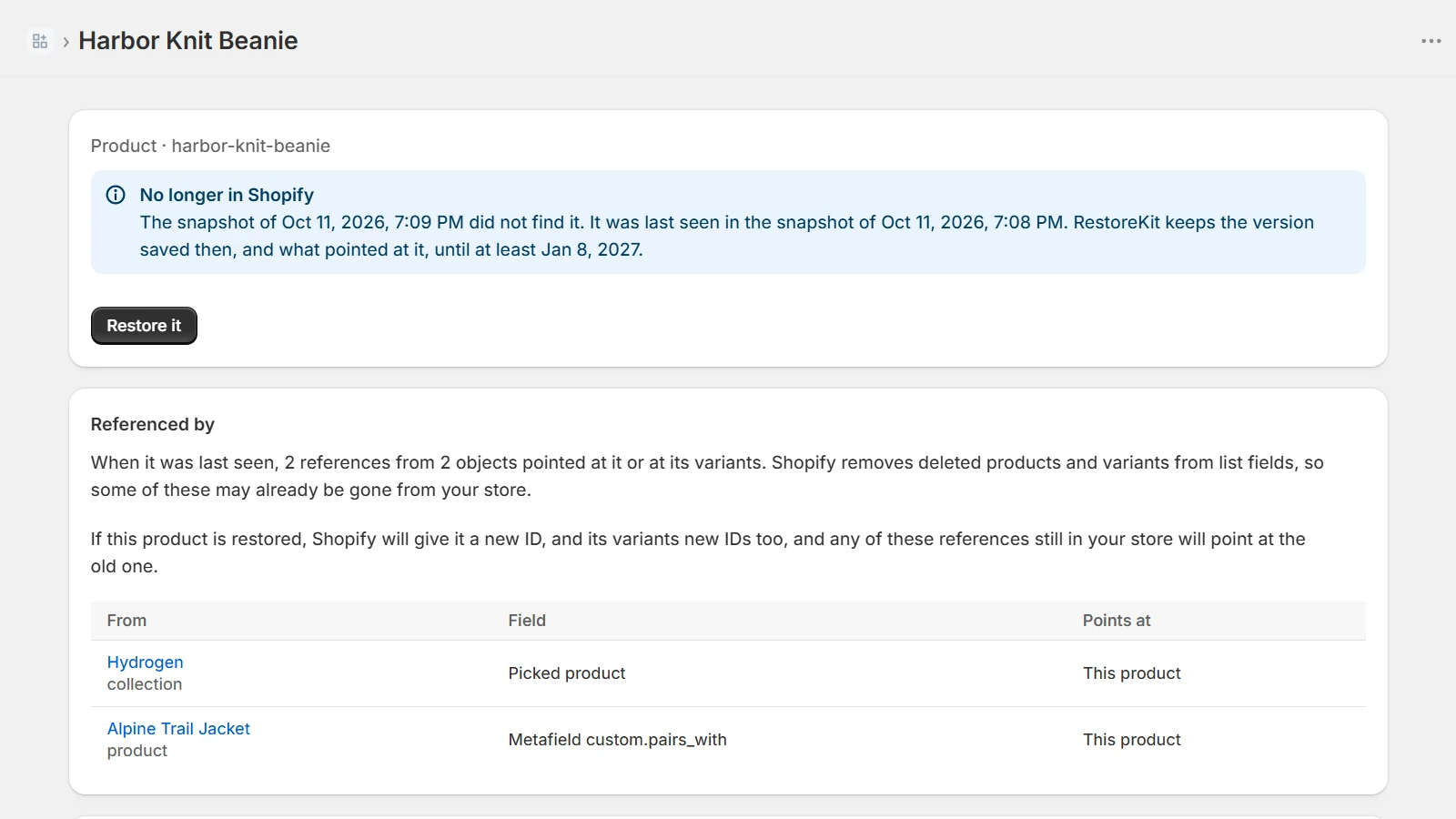
What to rebuild by hand
Work through this once the product is back. Each item has to come from memory or from a copy you took: Shopify no longer has a record of the connection.
- Reference metafields on other products, variants and collections — single values and lists, where the position in the list matters.
- Metaobject entries with a field pointing at it: a designer, a material, a care guide.
- Collections it was hand-picked into, and its place in one sorted manually.
- Theme sections and blocks pointed at it, which keep the old ID in the theme's settings.
- Apps that stored the ID — reviews, subscriptions, bundles — and anything outside Shopify that did the same.
The app I built for the second half
Bringing a product back is the part several apps do well. What pointed at it is the part none of the ones I looked at handle, and it is why I built RestoreKit. It snapshots products, variants, collections, metafields, metaobjects and their definitions — and the references between them, which is the part that disappears. Before a restore it says how many references the new ID would leave unresolved; after it, it offers to re-link them field by field, showing what each holds now and what it would hold. Anything it will not write is named with the reason, and a restore can be undone.
It is in review at the Shopify App Store at the time of writing.
Making it cheaper next time
- Archive instead of deleting. An archived product keeps its ID, its metafields and every reference to it.
- Export on a schedule, and keep the file somewhere other than the admin.
- Look at who can delete. Staff permissions are per member, and most people who edit products do not need to remove them.
Checked in September 2026, on a development store and against Shopify's help centre. If you are reading this later, check the help page on backups first — platforms do ship undo eventually.